Genie Code can now convert your legacy SQL. Here is what data engineers should know.
Databricks shipped an agentic code converter that translates proprietary SQL dialects to ANSI SQL. It is fast, it is useful, and it does not replace your judgment.
Every data engineer who has lived through a migration knows the pattern. You inherit a warehouse full of stored procedures written in a dialect nobody chose on purpose. T-SQL from a SQL Server era. Snowflake SQL from a team that moved fast. Oracle PL/SQL from before you worked there.
Converting that code by hand is slow, expensive, and error-prone. One missed function mapping and your numbers are wrong in a way nobody notices for months.
On July 30, 2026, Databricks announced something that changes the mechanics of this work. They call it the agentic code converter, and it lives inside Genie Code, their AI coding agent.
It translates proprietary SQL dialects to open ANSI SQL. The supported sources are T-SQL, Snowflake, Redshift, Oracle, BigQuery, and Teradata.
What the agentic converter actually does
You start by creating a migration project in your Databricks workspace. You upload your legacy SQL files. The tool then does three things.
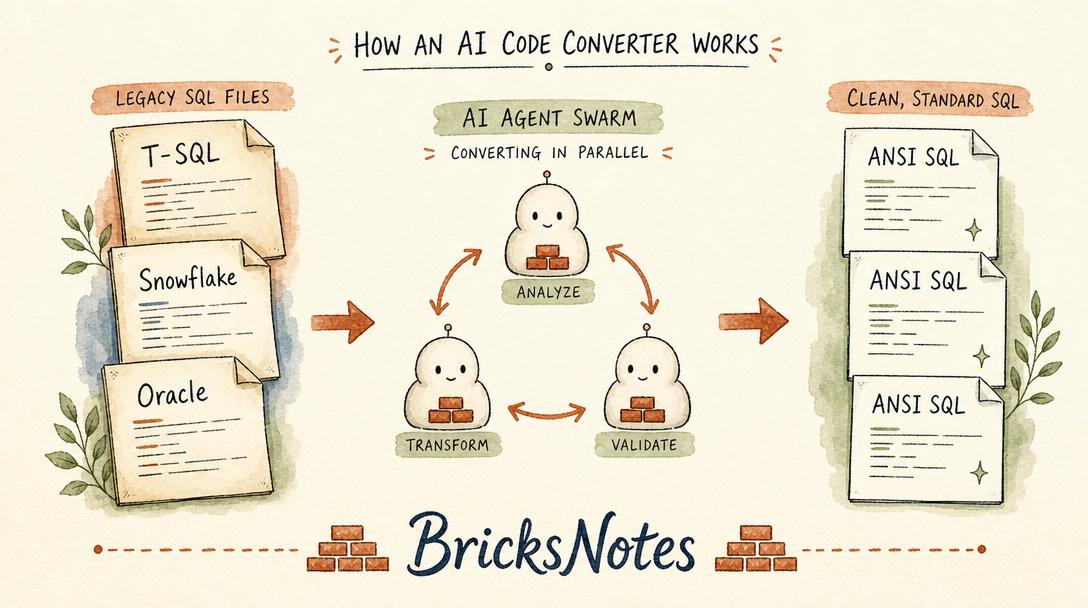
First, it scores each file by complexity. A simple SELECT with a few column renames scores low. A stored procedure with cursor logic and dynamic SQL scores high. You use these scores to decide what to tackle first.
Second, it maps lineage. It figures out which tables, views, and procedures depend on each other. If two files share no dependencies, you can migrate them independently. If one view feeds three procedures, those four objects need to move together.
Third, it launches parallel agents to convert each file. Each agent iteratively fixes errors, checking both syntax and semantic intent. The goal is that the converted code preserves the original business logic and actually parses as valid ANSI SQL.
When it finishes, the files are color-coded by status. Green means converted. Yellow means it needs human review, and the tool tells you exactly what to fix.
What open ANSI SQL means and why it matters
ANSI SQL is the standard. Every major database engine supports it, though each one also adds its own extensions. The extensions are where lock-in lives.
When your code uses Snowflake-specific functions or T-SQL syntax that only works on SQL Server, you are stuck. Moving to a new platform means rewriting, testing, and hoping you did not miss anything.
Open ANSI SQL is portable. If your code follows the standard, it runs on Databricks, on Postgres, on DuckDB, on anything that speaks SQL. The agentic converter pushes your code toward that standard.
This is not just a Databricks pitch. It is a real shift in how teams think about code ownership. When your SQL is portable, you choose your platform based on price and performance, not because your code only runs in one place.
What the tool does not do for you
This is the part that matters most, and it is where honesty helps.
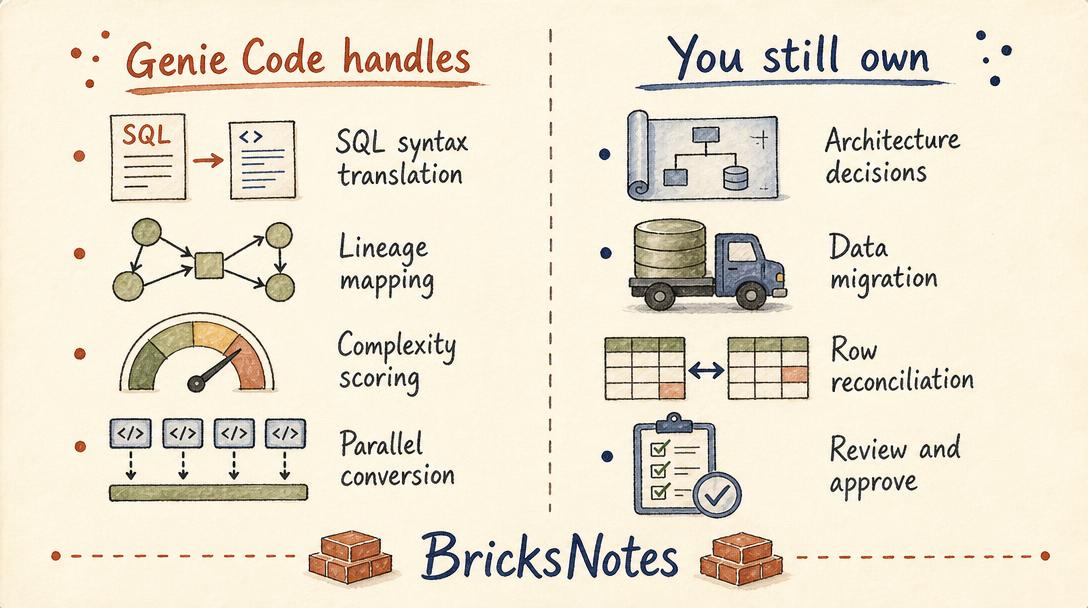
The converter translates SQL syntax and semantics. It does not migrate your data. It does not reconcile row counts between the old system and the new one. It does not decide your target architecture, your table layout, or your partitioning strategy.
It also does not replace review. The tool flags files that need human attention, and you should take that seriously. A stored procedure that uses a three-part naming convention in T-SQL needs to become a three-part name in Unity Catalog. The tool can tell you that, but it cannot decide whether your catalog structure is correct.
Databricks plans to add data migration and reconciliation to the migration project experience in the future. For now, those steps are yours.
How a data engineer should think about this
If you are facing a migration, here is a practical way to use the converter.
Start with the complexity scores. Migrate the easy files first. You build confidence, you learn the tool's patterns, and you create a library of converted code you can reference when the hard files come up.
Use the lineage graph to batch your work. Files with no shared dependencies can move in parallel. Files that depend on each other move as a group.
Use custom skills to codify your team's conventions. If your team requires stored procedures to use a specific naming pattern, write that as a rule. The converter applies it across every file automatically.
And review the diffs. The tool shows you a side-by-side comparison of the original and converted code. Read it. Understand it. The converter is good, but it is not perfect. Your judgment is still the last step.
Where to build the skills that make you migration-proof
The converter handles syntax. The harder part of any migration is understanding the data model, the governance layer, and the SQL fundamentals underneath it all.
If you want to strengthen those foundations, our Spark SQL chapter covers the query patterns that translate across platforms. The Data Sources chapter explains how to read from and write to different systems. The Unity Catalog chapter covers the three-part naming convention the converter relies on for stored procedures.
For the full picture, the book walks through all 29 chapters with hands-on examples that run on Databricks Free Edition.
If you are also thinking about certification, our Databricks certifications comparison breaks down which exam fits your stage.