Lakebase, explained simply. Where it came from and what to build with it
Managed Postgres inside the lakehouse, why Databricks built it, and the workloads it actually fits
For forty years, most companies ran two kinds of databases.
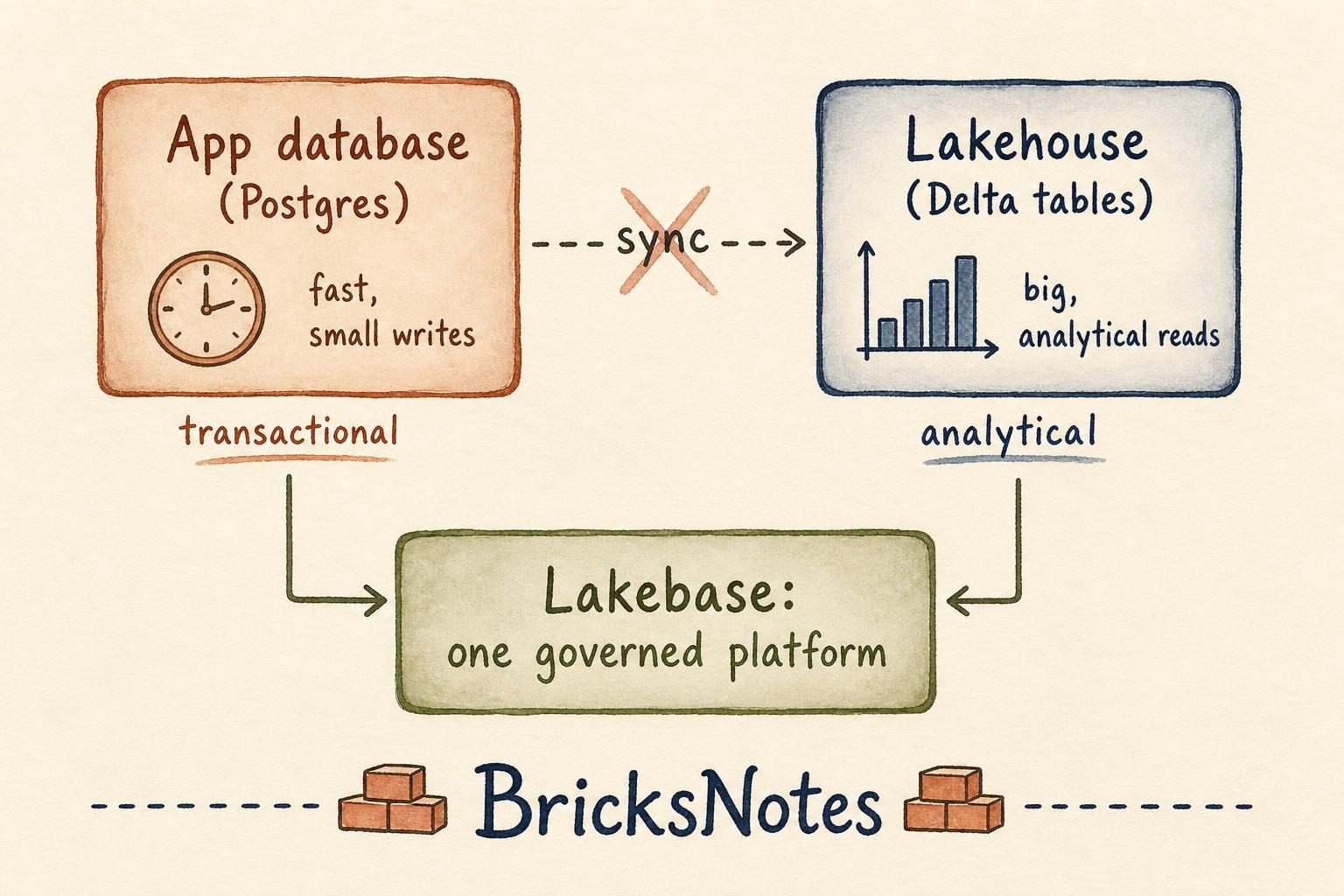
One kind ran the business. It sat behind the app, took small writes all day, and answered questions like "what is in this customer's cart right now." Usually Postgres or MySQL. Fast, transactional, boring in the best way.
The other kind explained the business. It held years of history, ran heavy scans, and answered questions like "which regions grew last quarter." That became the warehouse, and later the lakehouse.
Between them sat pipelines. Copy the app data out, land it in the lake, transform it, serve it back. If you have read The backfill or The event arrived two days late, you know how much engineering effort lives in that gap.
Lakebase is Databricks saying that gap does not need to exist.
What Lakebase actually is
Lakebase is a fully managed, serverless PostgreSQL database inside Databricks.
That is the whole simple explanation. It is real Postgres. Your app connects with a normal Postgres driver, you write normal INSERT and UPDATE statements, and you get normal transactions.
The difference is where it lives and what it is connected to. Lakebase separates storage from compute the way the lakehouse does. It scales to zero when nobody is using it. It sits under Unity Catalog, so the same governance you learned in the Unity Catalog lesson covers it. And the data it holds is reachable from the lakehouse without you building a copy job.
So you get the transactional behaviour of Postgres and the analytical reach of Delta, on one platform, under one permission model.
Why Databricks built it
Databricks did not start with a database. It started with Spark, which was built for analysis. Then came Delta Lake for reliable storage, Unity Catalog for governance, Lakeflow for pipelines, and Databricks Apps and Genie for the layer people actually touch.
Once you can build an app on the platform, a question shows up quickly. Where does that app store its state?
Before Lakebase, the honest answer was somewhere else. You stood up a Postgres instance in your cloud account, gave it its own credentials and its own backups, and then wrote a pipeline to bring its data back into the lakehouse for reporting. Two systems, two governance models, and a sync job in the middle that could quietly drift.
Databricks calls the fix LTAP, which stands for Lake Transactional and Analytical Processing. The idea is one copy of data in an open format, serving both the operational side and the analytical side. Lakebase is the transactional half of that idea.
You can read the platform-level view in Lakebase looks like a platform bet, not a side feature, and the practical comparison in Lakebase is GA. Do you still need a separate Postgres?.
Where it fits, with real use cases
The simplest way to know whether Lakebase fits is to ask what shape the workload has. Many small, fast, precise writes and reads means transactional. Few large scans over history means analytical. Lakebase is for the first shape, sitting next to the second.
A Databricks App that needs to remember things. You build an internal tool on Databricks Apps: a data quality review queue, an approval workflow, a labelling interface. Every click needs to be saved instantly and read back instantly. That is a transactional workload, and Lakebase is where it belongs. The analysts can then report on the same rows without a copy step.
Serving features and scores to an application. Your pipeline computes a churn score in the lakehouse overnight. The customer-facing app needs that score in a few milliseconds when the page loads. Lakebase holds the small, current, indexed version of what the lakehouse computed in bulk. The Machine Learning lesson covers how those scores get produced.
Reverse ETL that stops being a project. Segments, thresholds, and enriched attributes usually get pushed out of the warehouse into some operational store. When the operational store is on the same platform, that push shortens dramatically.
Pipeline and job metadata. Watermarks, run logs, retry counters, approval flags. Most teams end up hand-rolling this in a Delta table, which is awkward because Delta is not built for tiny single-row updates. This is exactly the friction we described in Incremental processing, and it is a natural Lakebase table.
Search for apps and agents. Lakebase now carries keyword and semantic search together, so a retrieval feature does not require standing up and syncing a separate vector store.
One honest boundary: Lakebase is not a replacement for your Delta tables. Do not point a dashboard that scans three years of orders at it. Analytical scans still belong in the lakehouse, with the layout habits from Partitioning and performance.
Why agents change the calculation
Here is the part that makes Lakebase more interesting than a convenience feature.
Every data platform ever built assumed a human was in the loop. A person opened a dashboard, read a number, and decided something. The platform's job ended at producing the number.
Agents break that assumption. An agent does not just read. It acts. And acting means writing: recording what it decided, keeping its own state between steps, tracking what it already tried, storing the outcome so the next run does not repeat the work.
Agents also work in bursts. Idle for hours, then hundreds of small operations in a minute. A serverless database that scales to zero and back fits that pattern far better than an always-on instance.
Then there is safety. Lakebase supports database branching, which means an agent or a coding assistant can take an isolated copy of a database, work against it, and be reviewed before anything touches the real thing. That is the difference between letting an agent experiment and letting an agent gamble.
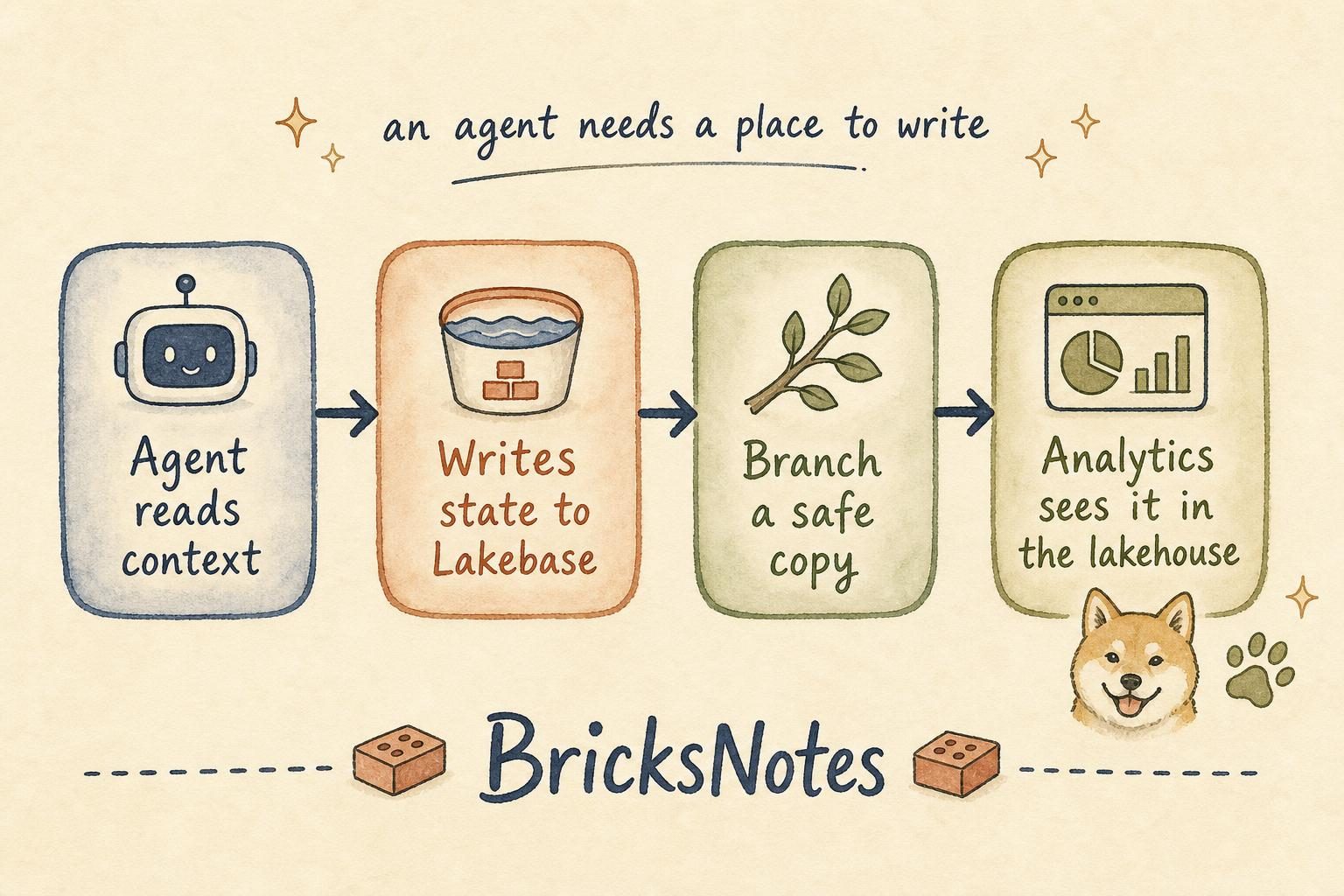
We wrote about this shift in The next database may be built as much for agents as for developers and The data stack is being redesigned for AI agents. Lakebase is what that argument looks like as a product.
There is a governance point here too. When an agent writes into a governed database instead of some side store nobody audits, you can answer what it changed and when. Agents that act need a place to write that a human can inspect later. If the context an agent works from matters to you, that is the subject of our sister book, The Context Advantage.
What this means for a data engineer
The practical shift is small and clear. The job stops being purely "move data from the operational world to the analytical world" and starts including "design where operational state lives on the same platform."
That means a few habits are worth building now.
Understand transactional versus analytical shapes well enough to place a table correctly. Keep governance in one place instead of two, because two permission models is how leaks happen. Learn to serve results, not just produce them, since a score nobody can read in ten milliseconds is a score nobody uses. And keep quality checks close to where data is written, in the spirit of The pipeline was green. The numbers were wrong.
None of this replaces fundamentals. A Lakebase table still needs a sensible key, a thought-through write pattern, and a plan for change over time. The Delta Lake and Data quality lessons still carry most of the weight.
Try it the small way
Do not architect a platform on day one. Do one honest exercise.
Take something you currently store awkwardly in a Delta table because you had nowhere else to put it. A run log, a watermark, an approval flag. Model it as a small Postgres table instead, write to it from an app or a job, and then query the same data from the lakehouse side. Notice how much pipeline you did not write.
That is the whole point. Lakebase does not add a new concept to learn so much as it removes a copy you used to maintain.
Continue learning
- Unity Catalog for the governance layer Lakebase sits under
- Databricks Apps for the application side of the platform
- Incremental processing for why small updates are awkward in Delta
- Lakebase is GA. Do you still need a separate Postgres?
- Your first data engineering project in Databricks Free Edition if you want to build the analytical half by hand first